
01-the-cyclone.md
Markdown workspace
Build documents the way software is built.
Many small Markdown files in an ordinary folder, composed into one
document. The files stay ordinary .md on disk.
All platforms · macOS & Windows
In the browser, opening your own folder needs Chrome, Edge, Arc or Brave on a computer.
Free while Moondonut is in preview. 1.0 will be paid, and everyone who downloads Moondonut before 1.0 gets a free 1.x licence. The deal you get now is the deal you keep.
01
Documents built
like software
A file becomes a composition the moment it contains one
@include line. Nothing is declared and no mode is
entered — the file simply starts standing for more than itself.
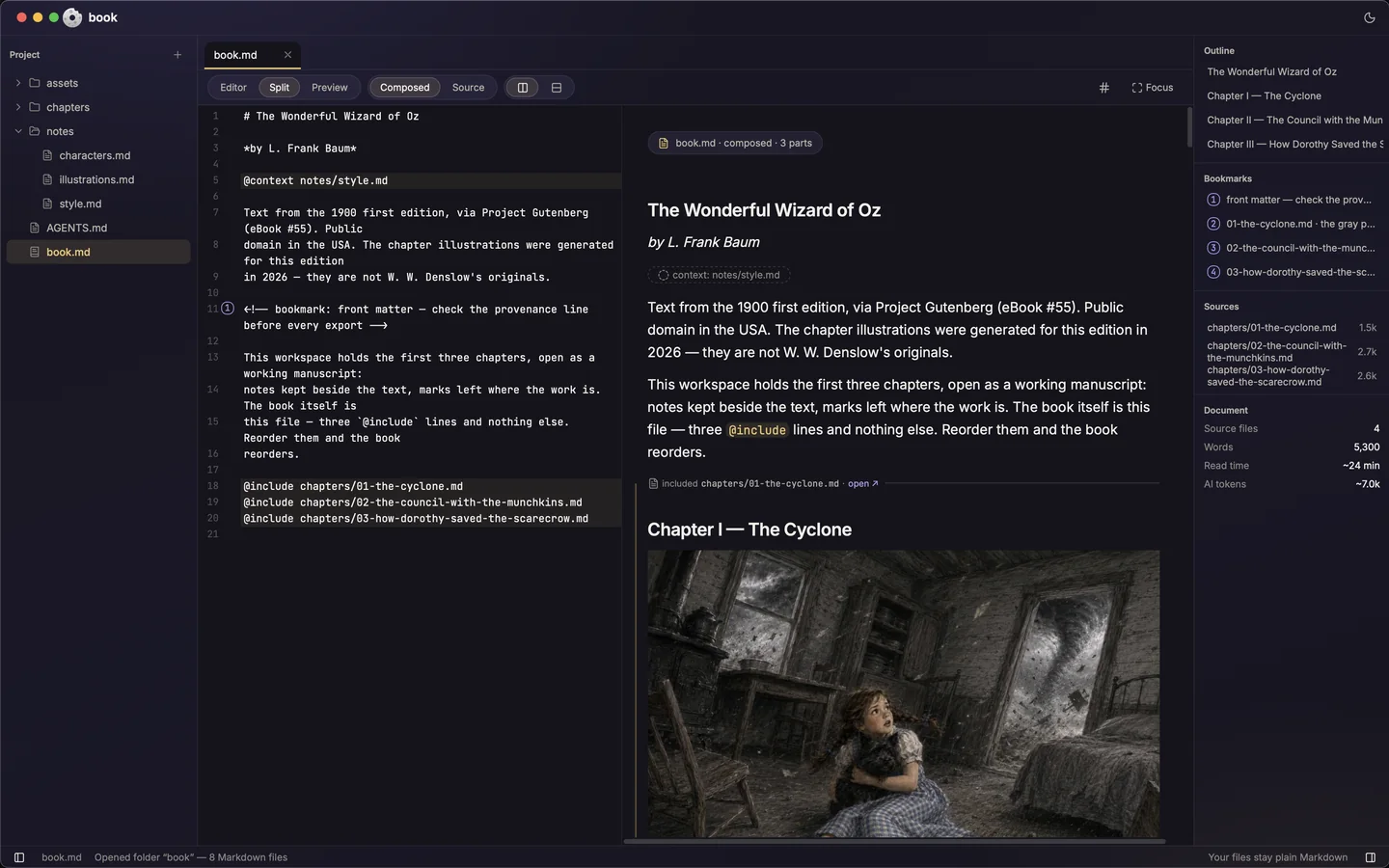
Edit a source once and every document that includes it is already changed. Reorder the lines and the book reorders: nothing else has to be updated, because nothing else knows the order.
Open the Book demoThe application
Source on the left, the composed document on the right. No import step and no project file — the folder is the project.
02
Your files stay yours
Project
- assets
- 01-the-cyclone.jpg
- 02-the-council.jpg
- 03-the-scarecrow.jpg
- chapters
- 01-the-cyclone.md
- 02-the-council-wi…the-munchkins.md
- 03-how-dorothy-s…the-scarecrow.md
- notes
- characters.md
- illustrations.md
- style.md
- AGENTS.md
- book.md
NameDate Modified
- MAGENTS.mdAug 24, 2026
- assetsAug 24, 2026
- 01-the-cyclone.jpgAug 24, 2026
- 02-the-council.jpgAug 24, 2026
- 03-the-scarecrow.jpgAug 24, 2026
- Mbook.mdAug 24, 2026
- chaptersAug 24, 2026
- M01-the-cyclone.mdAug 24, 2026
- M02-the-council-with-the-munchkins.mdAug 24, 2026
- M03-how-dorothy-saved-the-scarecrow.mdAug 24, 2026
- notesAug 24, 2026
- Mcharacters.mdAug 24, 2026
- Millustrations.mdAug 24, 2026
- Mstyle.mdAug 24, 2026
The same fourteen items, on disk, either way. Moondonut lists folders first; the Finder sorts by name. Nothing is copied, converted or renamed — the tree is the folder.
Moondonut is a lens over ordinary files, not a container holding them.
There is no import step, no library and no project file. Open the same folder in any other editor, diff it in Git, keep it wherever you keep things. Close Moondonut and the folder is exactly a folder again.
No accounts, no telemetry, no analytics. Quit with work unsaved and it is waiting when you come back. If it disappeared tomorrow you would still have every word you wrote, in the format you wrote it in.
A project is an ordinary folder, so the sync you already use just works. How that works
Open the Docs demo03
A workspace an
agent can read
Every project gets an AGENTS.md that says what the
directives mean, so an agent opening the folder can act on its
structure instead of being handed pasted fragments.
@context marks a file as background for the agent
rather than for the reader, and an export leaves it out unless you
ask for a copy meant for an agent.
Moondonut bundles no model and has no AI chat panel. What it offers an agent is a folder whose structure is legible. Which agent, and whether to use one at all, stays your decision.
Open the Proposal demo
AGENTS.md and both internal/ files stay
behind. The client receives three.
Many files. One document.
Free while Moondonut is in preview. 1.0 will be paid, and everyone who downloads Moondonut before 1.0 gets a free 1.x licence. The deal you get now is the deal you keep.